
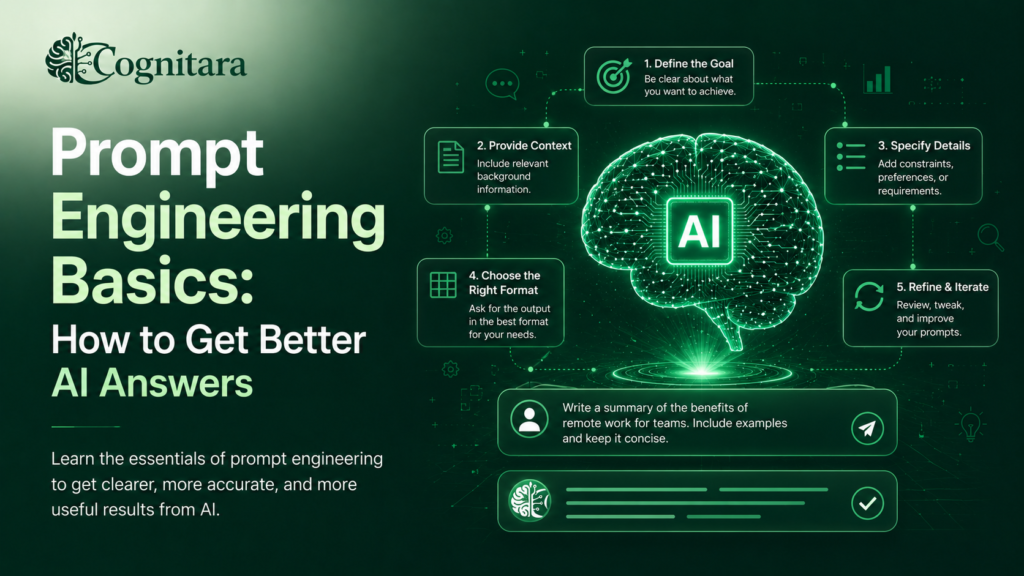
Prompt engineering is the practice of giving AI tools clearer instructions so they can produce more useful answers. The term may sound technical, but the basic idea is simple: if you want a better response, you need to explain the task better.
A prompt is the message, question or instruction you give to an AI system. It can be short, like “summarize this text,” or detailed, like “write a 600-word beginner-friendly explanation of artificial intelligence for small business owners, using simple language and practical examples.”
The quality of the prompt often affects the quality of the output. A vague prompt usually produces a vague answer. A clear prompt gives the AI more direction and usually leads to a more useful result.
Prompt engineering does not require coding. It is mostly about communication: defining the task, adding context, setting the format and explaining what kind of answer you need.
Why Prompts Matter
AI tools do not read your mind. They respond to the information you provide. If the instruction is unclear, the AI may guess what you mean. Sometimes that guess is close. Sometimes it is not.
For example, a prompt like this is too broad:
“Write about marketing.”
The AI could write about digital marketing, brand strategy, email campaigns, advertising, social media, market research or something else entirely.
A better prompt would be:
“Write a short introduction to email marketing for small business owners who have never sent a newsletter before. Use simple language and explain why email is useful for customer retention.”
This version gives the AI a topic, audience, format and goal. The answer is more likely to be specific and relevant.
Prompts matter because they reduce guesswork. They help the AI understand what output you expect.
The Basic Elements of a Good Prompt
A strong prompt usually includes several simple elements.
Task
The task tells the AI what to do. It may be to write, summarize, compare, explain, rewrite, classify, translate, analyze or generate ideas.
Examples:
“Summarize this article.”
“Compare these two tools.”
“Rewrite this paragraph in a clearer tone.”
“Create a list of blog post ideas.”
“Explain this concept for beginners.”
The task should be direct. If the task is unclear, the output will often be unfocused.
Context
Context explains the situation. It helps the AI understand the purpose behind the request.
For example:
“I am writing for small business owners.”
“This text will be used on a landing page.”
“The audience is beginner developers.”
“The goal is to explain the topic without technical jargon.”
Context is especially important for writing, strategy, analysis and recommendations. The same topic can require very different answers depending on the audience.
Format
The format tells the AI how to structure the output.
Examples:
“Use H2 headings.”
“Write in three short paragraphs.”
“Create a comparison table.”
“Give five examples.”
“Use a step-by-step format.”
Without format instructions, the AI chooses its own structure. Sometimes that works, but when you need a specific result, it is better to define the format directly.
Tone
Tone explains how the answer should sound.
Examples:
“Use a neutral expert tone.”
“Make it beginner-friendly.”
“Keep the explanation simple.”
“Avoid promotional language.”
“Write in a calm, practical style.”
Tone is useful when generating website copy, emails, articles, product descriptions or educational content.
Constraints
Constraints tell the AI what to include or avoid.
Examples:
“Do not use bullet points.”
“Keep the answer under 500 words.”
“Do not mention pricing.”
“Avoid hype.”
“Include practical examples.”
Constraints prevent the AI from using patterns you do not want.
A Simple Prompt Formula
A useful beginner formula looks like this:
I need you to [task].
The audience is [audience].
The goal is [goal].
Use this tone: [tone].
Format the answer as [format].
Include [important details].
Avoid [unwanted details or style].
For example:
“I need you to write a beginner-friendly explanation of generative AI. The audience is small business owners. The goal is to explain what generative AI can help with in everyday work. Use a calm and practical tone. Format the answer with short paragraphs and H2 headings. Include examples related to writing, images, customer support and productivity. Avoid hype and do not claim that AI replaces employees.”
This prompt is not complicated, but it gives the AI enough direction to produce a focused answer.
Weak Prompt vs Better Prompt
A weak prompt:
“Explain AI tools.”
This is too general. The AI does not know the audience, level of detail, format or purpose.
A better prompt:
“Explain AI tools for beginners who want to use them at work. Cover writing tools, coding tools, image tools and productivity tools. Use simple language, short sections and practical examples. Avoid technical jargon.”
The better prompt defines the audience, categories, style and structure. It reduces the chance of receiving a generic answer.
Another weak prompt:
“Write a blog post about prompts.”
A better prompt:
“Write a 900-word blog post about prompt engineering basics for non-technical users. Explain what prompts are, why context matters, how to define output format and how to avoid vague instructions. Use a practical educational tone.”
This kind of prompt works better because it gives the AI a clear writing brief.
Give Examples When You Need a Specific Style
AI tools often work better when you show them what you want. If you need a specific style, structure or tone, include an example.
For example:
“Rewrite the text below in the same style as this example.”
Or:
“Use this paragraph as a style reference. Keep the same level of simplicity and sentence length.”
Examples are helpful because words like “professional,” “friendly” or “clear” can mean different things. A sample shows the AI what those words mean in your specific case.
You can also provide a negative example:
“Do not write like this: ‘Unlock the revolutionary power of AI today.’ Write in a more practical and neutral tone.”
This is useful when you want to avoid exaggerated marketing language.
Ask for a Structure Before the Final Answer
For longer content, it is often better to ask for an outline first. This gives you a chance to review the structure before the AI writes the full text.
Instead of asking:
“Write a full article about AI automation.”
You can ask:
“Create an outline for an article about AI automation for beginners. The article should explain what automation is, how AI supports workflows, examples of simple automations and common mistakes to avoid.”
After reviewing the outline, you can ask the AI to write each section. This approach usually produces cleaner long-form content because the structure is controlled before the writing begins.
It is also useful for reports, guides, landing pages, educational articles and comparison content.
Use Follow-Up Prompts
Prompt engineering is not always about writing one perfect prompt. Often, the best results come from several prompts.
You can ask the AI to improve, shorten, expand, rewrite or reorganize the answer.
Examples:
“Make the answer more practical.”
“Add examples for small businesses.”
“Remove repetition.”
“Rewrite this in simpler language.”
“Turn this into a table.”
“Make the tone less promotional.”
“Add a short conclusion.”
“Check whether the structure is logical.”
Follow-up prompts are useful because the first answer is often just a draft. You can improve it step by step.
Be Specific About What You Do Not Want
Many AI answers sound generic because the prompt does not block generic patterns. If you know what you dislike, say it directly.
Examples:
“Do not use phrases like ‘revolutionize your workflow.’”
“Do not make exaggerated claims.”
“Do not write a sales pitch.”
“Do not use complex technical terms.”
“Do not include information that is not directly related to the topic.”
These instructions help the AI avoid unwanted tone and content.
For business, education and informational writing, this is especially important. A clear “avoid” section can make the output more trustworthy and readable.
Prompting for Research
When using AI for research, prompts should focus on organization and explanation. AI can help summarize and compare information, but important facts should still be verified.
Useful research prompts include:
“Summarize the main points of this article.”
“Extract the key arguments from this document.”
“Compare these two approaches in a table.”
“List the assumptions in this text.”
“Create questions I should ask before trusting this source.”
For research tasks, it is better to ask AI to help process information, not invent facts. When accuracy matters, always check original sources.
Prompting for Writing
For writing tasks, include the audience, goal, tone and format.
Example:
“Write a 700-word article for freelancers about using AI tools to save time on content planning. Use a practical tone, include examples and avoid hype.”
You can also ask for variations:
“Give me five headline options.”
“Rewrite this introduction in a clearer style.”
“Make this paragraph shorter.”
“Create a more neutral version.”
“Adapt this text for beginners.”
AI writing tools are most useful when treated as drafting and editing assistants, not automatic final writers.
Prompting for Coding
For coding tasks, provide the language, framework, goal and error context if relevant.
Weak prompt:
“Fix this code.”
Better prompt:
“I am using JavaScript and React. This component does not update after the button click. Here is the code and the error message. Explain the likely cause and suggest a minimal fix.”
AI coding answers should always be tested. The prompt can improve the suggestion, but it cannot guarantee correctness.
For code review, you can ask:
“Review this function for readability, edge cases and possible security issues. Do not rewrite the whole function unless necessary.”
This gives the AI a clear review scope.
Prompting for Images
For image generation tools, prompts usually need visual details. A good image prompt may include subject, style, lighting, composition, colors, mood and format.
Weak prompt:
“Create a futuristic city.”
Better prompt:
“Create a wide cinematic image of a futuristic city at sunset, with glass towers, soft orange light, flying public transport, clean streets and a calm optimistic mood.”
Image tools can interpret prompts differently, so users often need several attempts. The clearer the visual direction, the easier it is to get useful results.
Common Prompting Mistakes
One common mistake is being too vague. Another is asking for too many things at once. A third is not giving enough context. Many users also forget to define the output format, which leads to messy answers.
Another mistake is expecting AI to know facts, preferences or business context that were never provided. If the AI needs details, give them directly.
Finally, users sometimes accept the first answer even when it is only a rough draft. Better results often come from revision.
A Quick Prompt Checklist
Before sending a prompt, check these questions:
What exactly do I want the AI to do?
Who is the answer for?
What context does the AI need?
What format should the output use?
What tone should it have?
What should it avoid?
Do I need examples?
Will I review the result before using it?
This checklist is simple, but it solves many common prompting problems.
Final Thoughts
Prompt engineering is not about memorizing complicated formulas. It is about giving AI tools better instructions. A useful prompt defines the task, provides context, sets the format, explains the tone and includes important constraints.
The better the prompt, the less the AI has to guess. That usually leads to cleaner, more focused and more useful answers.
For beginners, the best way to improve is to test prompts on real tasks. Start with simple instructions, review the output and adjust your prompt based on what is missing. Over time, prompting becomes less mysterious and more like clear communication.